DZGarage Cockpit: a rally computer for a classic Audi in six months
Three microcontrollers, two GPS receivers and about 23,000 lines of C++ to run the Spain Classic Raid with my brother. What I built for the #89 Audi 100 and how.
Why
On October 17, 2026 we start the XII Spain Classic Raid in car #89, an Audi 100, with my brother Andrés. We share the driving and we take turns between the wheel and the co-driver seat over the race days. Four days, Gijón → León → Salamanca → Ávila → Palencia, on a route the organizers promise with mud, sand and rocks.
The Classic Raid is a regularity rally, where you have to pass every control at the exact time. The organizers publish an average speed for each timed section (TC, from the Spanish tramo cronometrado), hide controls along the route and penalize every second early or late. Between TCs there are the liaisons, where you have to reach the next control on time without flying through the villages. The co-driver keeps calculating distance covered, time elapsed and how early or late we are, with the car bouncing, while reading a paper roadbook and calling the corners.
The usual setup is an app on a tablet and a commercial GPS box. I wanted my own device, one that knows how we race, shows the numbers that matter in big digits, survives a power cut and that I can fix in the hotel room the night before a stage. That device ended up being the DZGarage Cockpit, made in DZ Lab (where I keep experiments and prototypes) for the DZ Garage team.
The first commit landed on April 28, 2026. Six months and around 650 commits later, the box is mounted on the dashboard and frozen at tag v0.2, ready for Saturday.
What I built
It's three microcontrollers, two GPS receivers, a touchscreen, a tablet and a phone, all talking to each other inside the car.
The cockpit, the rally computer
The core is an ESP32 with a 3.2″ touchscreen and a microSD for logs. It lives in a 3D-printed box for the dashboard, with six physical buttons around the screen:
- ±1 m and ±10 m, in two columns on the sides of the screen, one under each thumb, to bring the trip meter to the roadbook figure after a hairpin.
- MODE and RST. RST is sunk inside a guard ring and you also have to hold it down, so a gloved hand dragging across the panel doesn't zero the trip the crew is navigating with.
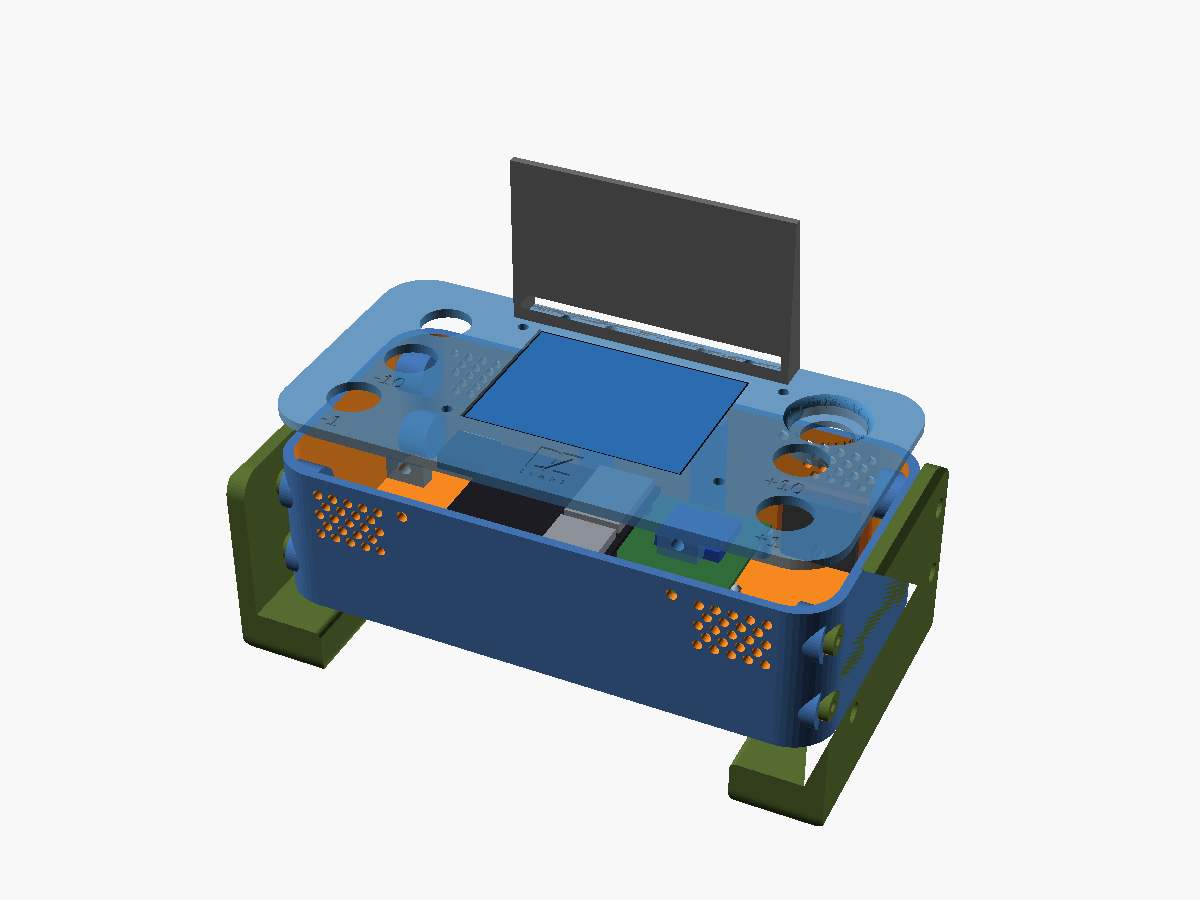
The cockpit owns the odometer, the time of day and all the screens. It also brings up a Wi-Fi access point that feeds live GPS to the navigation app on the tablet, so tablet and cockpit always read the same position.
The neopod, the wired GNSS receiver
A windshield pod with another ESP32, a GNSS receiver and a tiny screen showing status, joined to the dashboard box by a 1.5 m cable that carries power and data. If the cable fails, the pod switches to Bluetooth on its own. The cockpit prefers the cable when the data is fresh and uses Bluetooth when it isn't.
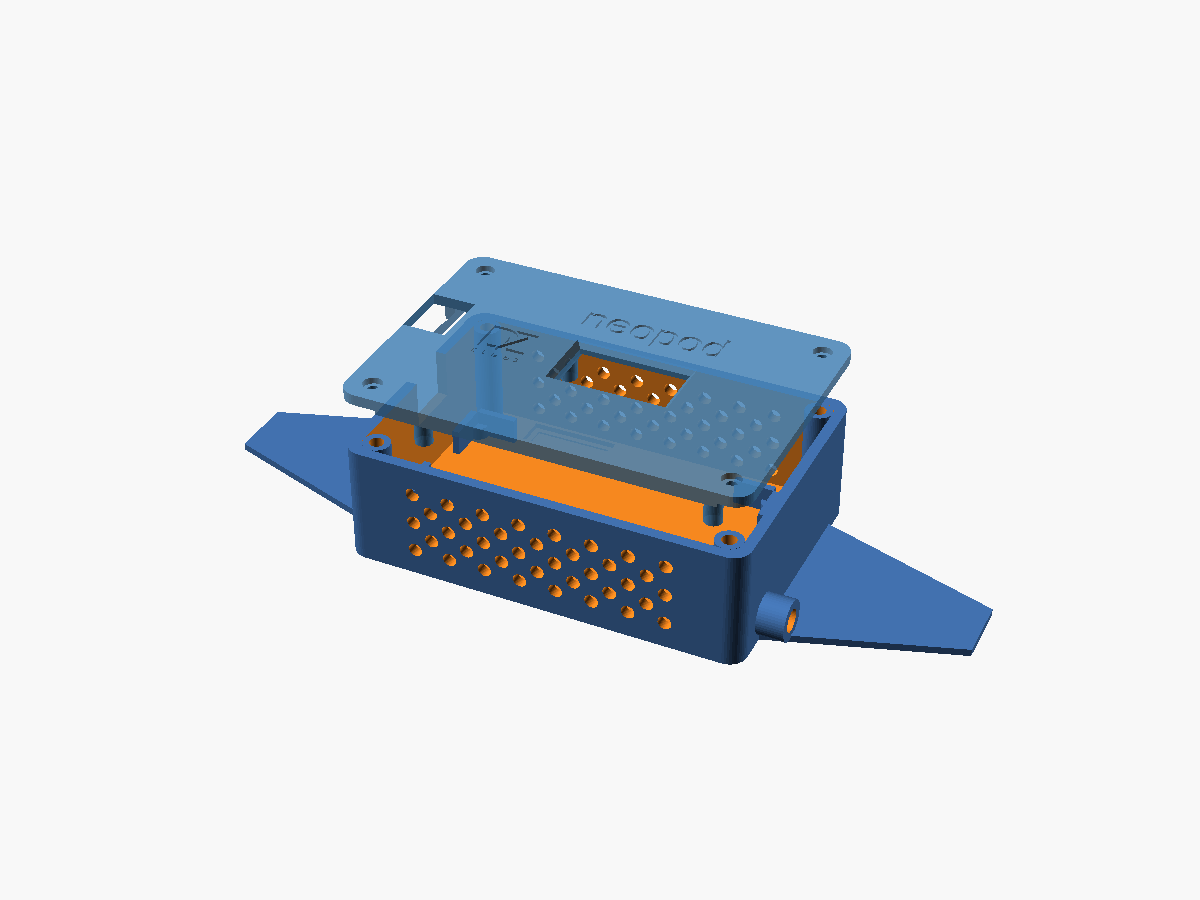
The collector, the second GPS source
A third ESP32, no screen, that connects over Bluetooth to a Garmin GLO and passes the positions to the cockpit by cable. It also reads the six panel buttons.
Two receivers, one decision
With two GPS sources you've got to pick which one to use without the odometer quietly losing or gaining meters. An arbiter decides which receiver is active. The crew picks the primary, the other one stays as automatic backup, and a deadband with asymmetric dwell times stops a source that wobbles right on the threshold from eating distance off the trip.
A FUENTES (sources) screen shows both receivers side by side, with the distance between their positions as the main number. If they're more than a few meters apart, one of them is wrong. On the test drives the GLO measured speed and distance cleaner, so it became the primary and the pod the backup.
What it does
The firmware is about 23,000 lines of C++ in the cockpit alone. Everything on screen is in Spanish (the crew's language) through an i18n table.
The odometer computes distance with haversine, with a low-speed threshold, a GPS sanitizer that throws away jumps and frozen fixes, and a calibration factor R so it measures the same as the organizers' one. A calculator on the device itself gets R from two official references at least 10 km apart, with a confirmation screen that shows old → new before applying it.
Every day the organizers hand out a control card with a start time and a cascade of offsets to each control. You type the start time once (with shortcuts for "next full minute" and "next :30") and the ideal time of each TC comes out by itself. Any change that recalculates the day asks for confirmation, and the dialog says what's going to move ("recalcula TODOS los TC de hoy", recalculates ALL of today's TCs).
On liaisons, the ENLACE screen shows the next control and its time, the kilometers left, the required average speed and the margin in green, amber or red, with an early-arrival cushion of 5 to 15 minutes already included. In the last 30 seconds before a control, a full-screen countdown takes over everything.
Table TCs
Some timed sections come as a paper table with passing times every 100 m, which they give you about 10 seconds before the start. The table is built from a handful of constant-speed segments, so a whole sheet reduces to a few cadences ("13 s every 100 m from 0.0, 10 from 0.3…"). The co-driver types those few numbers and the race screen shows a huge early/late figure, the next speed change and a CAMBIO warning 100 m before it.
The rest
- HITOS for sections timed at posts on the side of the road, and +MIN for the "add N minutes" announcements and neutralizations, again with a dialog listing every time that moves.
- The rulebook's grace zones: no secret control can be closer than 500 m to a start or a finish, or closer than 250 m to a speed change. The screen shows that window, which is where you can catch up calmly.
- Tulip log. Holding the corner of the race screen for 2 s saves the roadbook tulip number together with the trip, the time and the position at that moment, to review later or to find the way back.
- Rescue QR. The last known position as a Google Maps QR, in case we have to tell someone where we are.
Configuration goes through the web, at 192.168.4.1. The cockpit serves a phone-sized site from its own access point: settings, the day's stage planner on a timeline, the TC plans, the tulip log, diagnostics and the SD logs. You get in with a QR that shows up on the screen. Nothing comes from outside the car, which is what the rules ask for.
Session logs go to the SD: one CSV per boot, at 10 Hz while moving, a keepalive row every two minutes when we're stopped, plus an event row for each crew correction. Rows get synced every few seconds, so if the car reboots almost nothing is lost. Every night the browser builds a GPX and a combined CSV for the day straight from the card.
The firmware's also ready to live in a car. Every board has loop watchdogs and saves the reason for the last reset. If there's a brownout in the middle of a TC or a liaison, it resumes without losing kilometers. A tunnel doesn't reset the screen or close an open keypad. There's a screensaver that dims and shifts around when we're stopped, and the firmware version comes from git describe and gets stamped on the boot banner and in the header of every log.
The physical part
All the boxes are parametric OpenSCAD, printed on a Prusa Core One: the dashboard box (now "panoramic", 175 × 87 mm, after a square v0.4 that looked like any electronics project box), a separate anti-glare visor, the neopod, the cable glands and the mount.
The mount is an IKEA SKÅDIS pegboard cut to 460 × 360 mm, resting on the dashboard on the co-driver side, with printed arms, a rest, a hinge and bases for the cockpit box and for a tablet in portrait. It went into the car on October 14 and it's holding up. Power comes from the car's 12 V, stepped down to 5 V over USB. There's no battery and no telemetry.
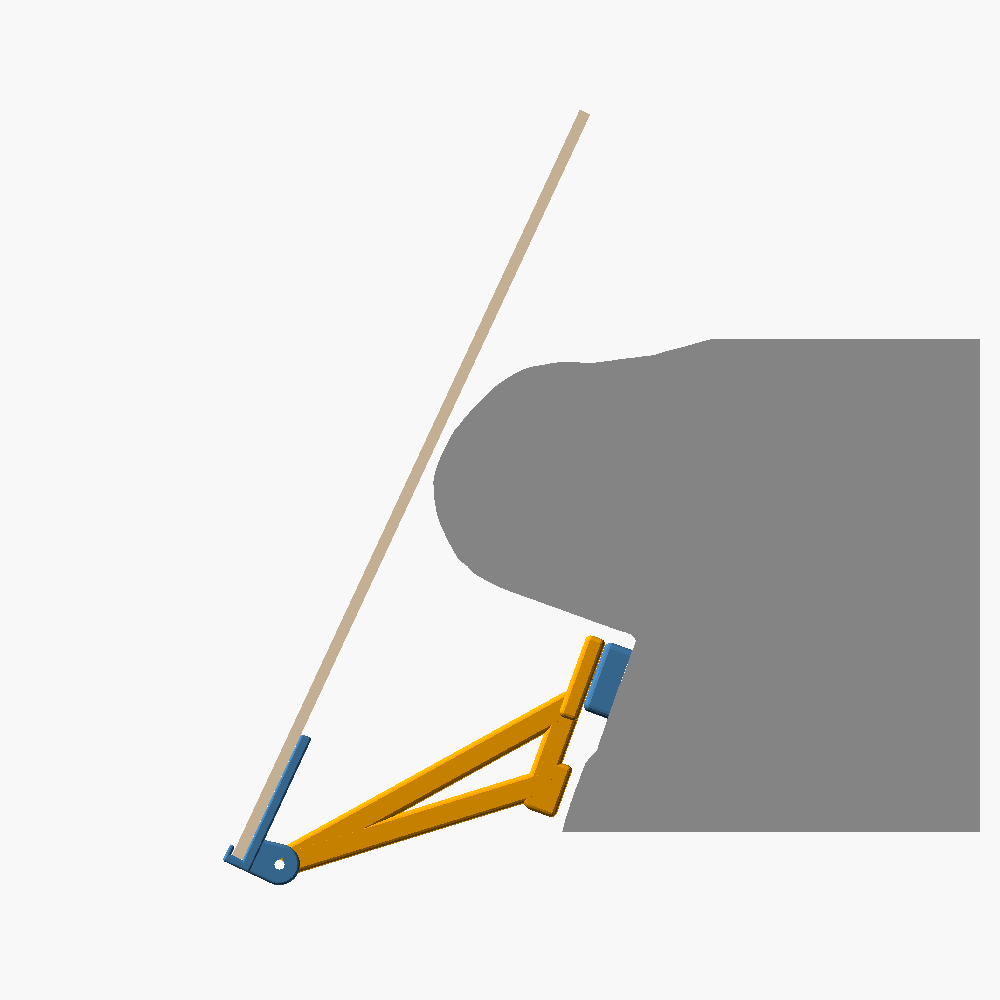
The wiring is generated too. A Python script draws the harness, the hole patterns and the plan view in SVG, and builds an assembly guide in HTML, so the drawings can't drift from the CAD numbers. There are assert()s in the models that break the build if a button nut hits the screen PCB or a wall.
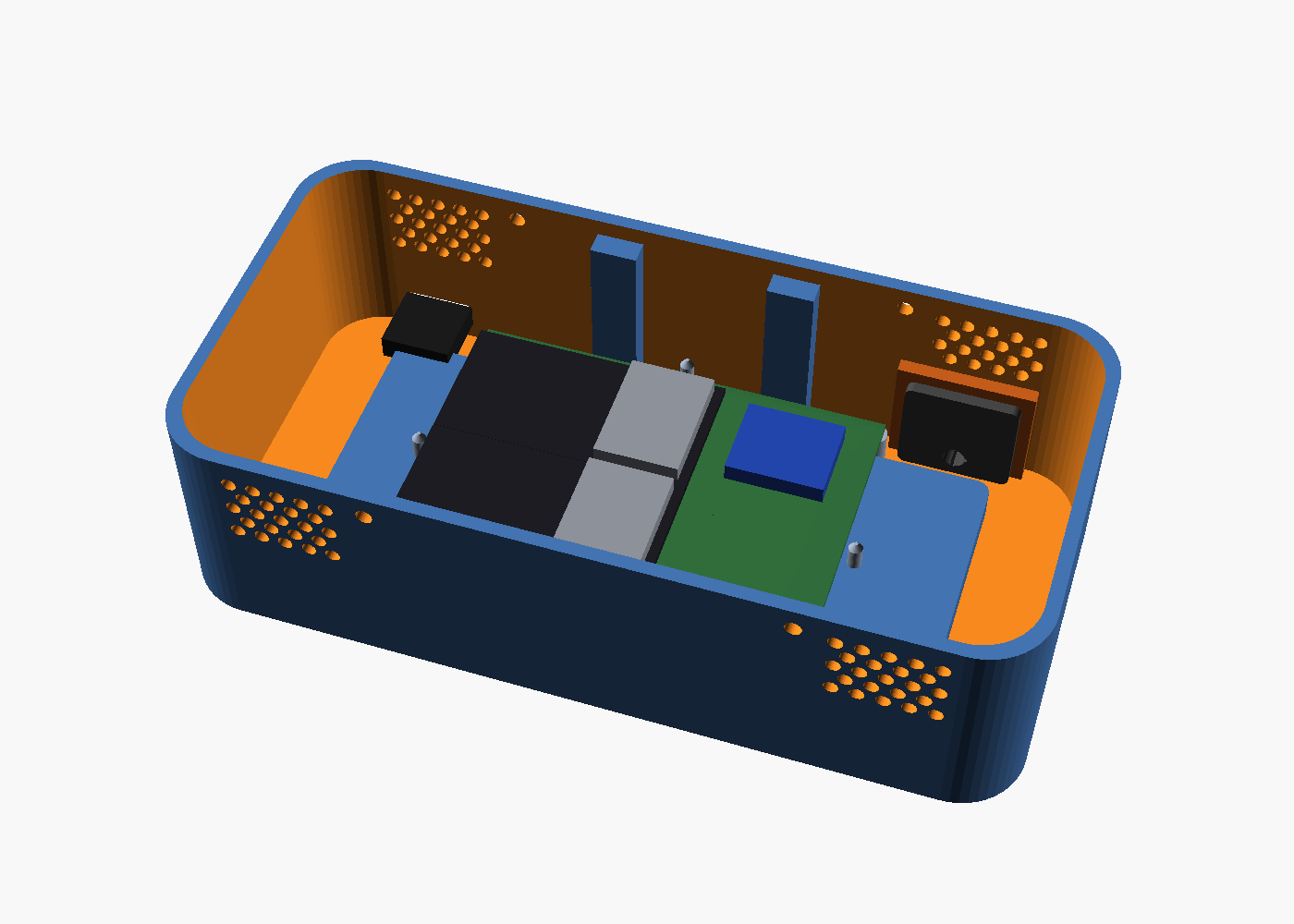
assert()s find the collisions before printing.Everything you see here is renders. Photos of the real boxes go in the next post.
How I built it
The firmware is built with PlatformIO, with every version pinned. There's a set of native unit test suites that run on the Mac and cover the odometer, the GPS filter, the source arbiter, the day plan, the tables, the SD log, settings persistence and the strings table.
So I didn't depend only on going out on the road, there's a desktop simulator that pushes synthetic routes (hairpins, slopes, tunnels, trees covering the sky) through the real filter and odometer code, to see where a mountain stage loses meters. A second harness connects the real pod over BLE to the same engine, no cockpit in between.
I also did practice runs on real roads, pulling the logs over Wi-Fi to replay them offline. With that data I picked the primary receiver, the GNSS dynamic model and the calibration procedure.
Parts are designed in OpenSCAD and sliced with PrusaSlicer, behind a make print that refuses to send unstable parts. The prototypes are PLA, with heat-set brass inserts.
The project was organized with Markdown documents: one design doc per feature (UX rules, table mode, day plan, settings), one for overall status, a task log and a rally checklist with dates that each commit keeps ticking off. Feature freeze was October 13.
For the crew there are how-tos in Markdown, in Spanish, that a Python script with headless Chrome turns into phone-sized PDFs and into text ready for WhatsApp: how to prepare a stage, crew practice, a photo protocol, the stage plan, hotels, a leaving-home checklist and an "if something breaks" page for the glove box.
Claude Code as co-engineer
Most sessions were pair work with Claude Code: reviewing the firmware looking for failure modes I hadn't thought of (it found the tablet wasn't getting a single frame, three weeks before the rally), writing native tests, iterating the CAD from photos of the real boards and keeping the docs in sync with the code. When my photos or what I measured with the caliper didn't match the plan, we changed the plan. And every decision got written into a document, so the next session could start from zero without me explaining anything.
Where it is now
The three boards are flashed from a tagged release. The box is in the car, both GPS sources worked on real roads and the tablet takes its position from the cockpit. We haven't raced yet. Saturday morning in Gijón we'll find out if the numbers on the screen are worth more than a stopwatch and a pencil.
I'll write that part after Palencia, in a second post: how the thing did in the race, what broke, what we'd change, and real photos of the car, the mounted boxes and the screen in the middle of a stage.